


Table of Contents
ToggleCreate a Long Date & Live Clock with Milliseconds in JavaScript
Build a dynamic Long Date & Live Clock with Milliseconds step-by-step guidance using JavaScript with source code.
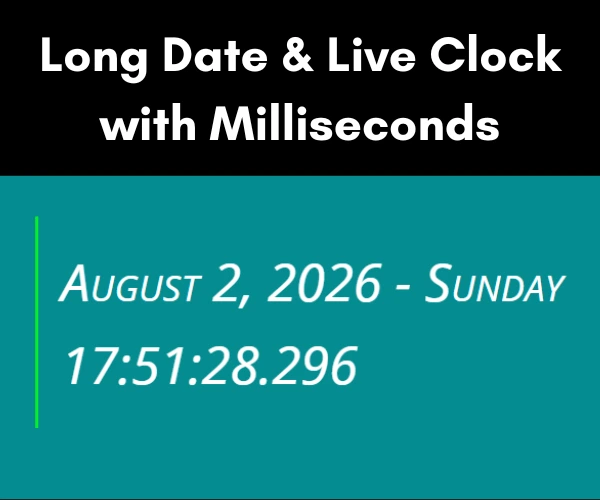
Learn to build a real-time digital clock using JavaScript with this step-by-step developer tutorial. You’ll explore the JavaScript Date object to display the current long date, time, and milliseconds in real time. This guide includes practical code examples, explains how to update he clock efficiently using timers, and demonstrates how to create a responsive live clock that can be integrated into any website or web application.
- HTML CODE
To begin, create a new HTML file that serves as the foundation for your JavaScript long date & real time project. This file contains the essential HTML structure required to display live date and time. Once the file is created, copy and paste the code below, then save it with a .html extension so it can be opened and tested in any modern web browser.
The following explanations of each HTML element and its role in the application.
Inside the <body>, the timedate container acts as the main wrapper for the clock interface. It contains two empty <div> elements with the IDs date and time, which serve as placeholder for dynamically generated content. Keeping the HTML minimal and sematic allows JavaScript to update these elements efficiently through DOM manipulation without reloading the page.
The external script.js file contains the logic for retrieving the current system date and time, formatting the output, and updating the clock with millisecond precision in real time. This modular structure follows modern web development best practices by separating structure, styling, and functionality. Overall, the code is lightweight, responsive, SEO-friendly, and provides an excellent foundation for developer who wants to create interactive digital clock and date application using HTML, CSS, and JavaScript.
<!DOCTYPE html>
<html lang="en">
  <head>
    <title>Live Clock in JavaScript with Millisecond</title>
    <meta charset="UTF-8" />
    <meta name="viewport" content="width=device-width" />
    <link rel="stylesheet" href="styles.css" />
  </head>
  <body>
    <div id="timedate">
      <div id="date"></div>
      <div id="time"></div>
    </div>
    <script src="script.js"></script>
  </body>
</html>- CSS CODE
With the HTML foundation complete It’s time to enhance the clock’s appearance using CSS.
In this step, we’ll create a dedicated CSS file and apply styling rules to design the clock face, position its elements, and achieve a clean, responsive layout.
Let’s examine each CSS rule and understand its purpose.
This CSS code styles a responsive digital date and time display by combining modern typography, spacing, and color techniques. The body selector applies a teal background (#048c91), creating a clean interface that improves the visibility of the clock. The #timedate container uses the font shorthand property to define a small-caps, lightweight font with a large 45px size and 160% line height for excellent readability. A font stack including Source Sans 3, Noto Sans, DejaVu Sans, Arial, and sans-serif ensures consistent rendering across browsers and operating system.
The width: 50% property creates a responsive layout while margin: 40% auto horizontally centers the container. White text (#fff) provides strong contrast against the background, and the border-left: 3px solid #07ee2a adds a modern accent to highlight the content. Finally padding: 20px creates comfortable internal spacing, resulting in a professional, user-friendly digital clock interface suitable for JavaScript clock projects and responsive web applications.
body {background-color:#048c91;}

#timedate {
  font: small-caps lighter 45px/160% "Source Sans 3", "Noto Sans", "DejaVu Sans", Arial, sans-serif;
  text-align:left;
  width: 50%;
  margin: 40px auto;
  color:#fff;
  border-left: 3px solid #07ee2a;;
  padding: 20px;
}- JavaScript
This JavaScript code powers a Live Digital Clock with Millisecond by continuously retrieving and displaying the current date and time in real time. The clockUpdate() function creates a new Date object to access the current hours, minutes, seconds, milliseconds, day, month, and year. It uses the toLocalString() method to display the full month name and toLocalDateString() to show the weekday in readable format, creating a professional and user-friendly date display.
The helper functions addZeroPadding() and addZeroPaddingMilliseconds() ensure that single-digit values and milliseconds are always displayed with leading zeros, maintaining a consistent digital clock format. After formatting the date and time, the scripts updates the HTML elements with the IDs date and time using the DOM innerHTML property, allowing the content to refresh dynamically without reloading the webpage. The setTimeout(clockUpdate, 1) method repeatedly calls the function every milliesecond, enabling smooth and accurate real-time update. Finally, the clockUpdate() function is invoked once to start the clock immediately after the page loads.
This modular JavaScript implementation follows modern development practices by separating formatting logic into reusable functions, improving code readability, maintainability, and scalability. Developers can easily extend this project by adding features such as 12-hour and 24-hour time formats, multiple time zones, dark mode, countdown timers, alarms, or animated transitions, making it an excellent example for learning DOM manipulation, the JavaScript Date Object, and real-time web application development.
function clockUpdate() {
  var now = new Date();

  var hrs = now.getHours();
  var mts = now.getMinutes();
  var seconds = now.getSeconds();
  var milliseconds = now.getMilliseconds();
  var month = now.toLocaleString('default', { month: 'long' }); // Get month name

  var time = hrs + ':' + addZeroPadding(mts) + ':' + addZeroPadding(seconds) + '.' + addZeroPaddingMilliseconds(milliseconds);
  var date = month + ' ' + now.getDate() + ', ' + now.getFullYear() + ' - ' + now.toLocaleDateString("en-US", {
  weekday: "long"});

  document.getElementById('date').innerHTML = date;
  document.getElementById('time').innerHTML = time;

  setTimeout(clockUpdate, 1); // Millisecond update
}

// Function to add zero padding to numbers less than 10
function addZeroPadding(num) {
  return (num < 10 ? '0' : '') + num;
}

// Function to add zero padding to milliseconds less than 100
function addZeroPaddingMilliseconds(num) {
  return (num < 100 ? '0' : '') + (num < 10 ? '0' : '') + num;
}

// Clock Start
clockUpdate();
Conclusion & Final Thoughts - Long Date and Live Clock with Milliseconds
Congratulations on successfully completing this tutorial on building a Long Date and Live Clock with Milliseconds using HTML, CSS, and JavaScript. In this project you learned how to create a real-time digital clock that automatically displays the current date and time with millisecond accuracy. You also discovered how to structure the project using separate HTML, CSS, and JavaScript files, making the code clean, organized, and easy to maintain.
Using JavaScript’s built-in Date object, you retrieved the current hours, minutes, seconds, milliseconds, day, month, and year. You then displayed this information on the webpage by updating the HTML element dynamically through DOM manipulation. To improve the appearance of the clock, you added leading zeros to single-digit and formatted milliseconds correctly for a professional digital clock display. This project provides a strong foundation for learning real-time JavaScript programming and can be expanded with features such as a 12/24-hour format, multiple time zones, dark mode, countdown timers, alarms, or other interactive clock functions.