


Speech Synthesizer with HTML, CSS, and JavaScript
Create a free voice synthesizer that support multiple languages using HTML, CSS, and JavaScript. This step-by-step tutorial includes source code tailored for beginners.
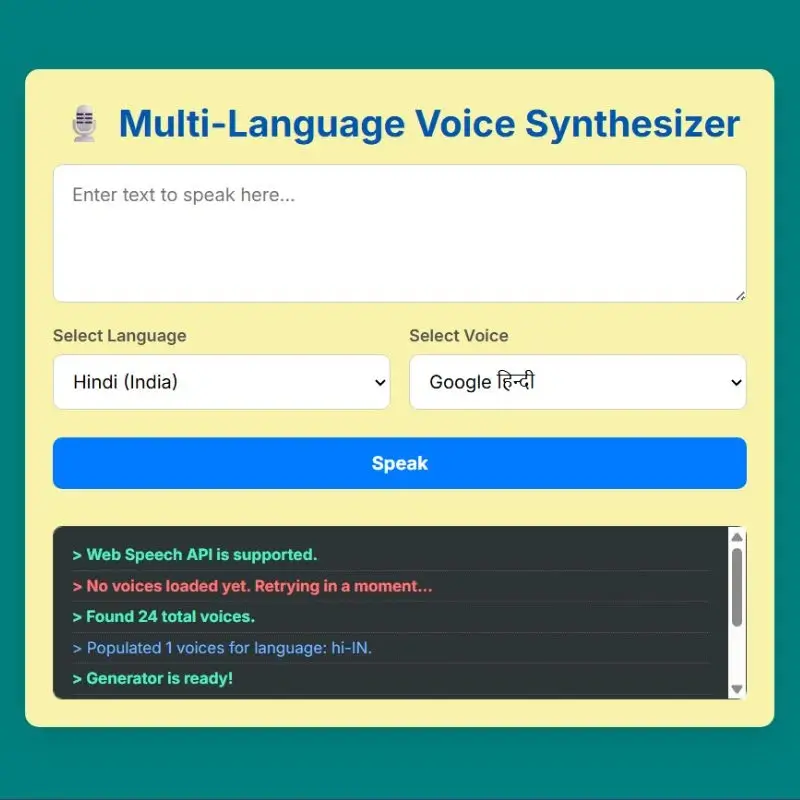
Voice technology is prevalent in our lives, seen in applications like Google Translate and virtual assistants like Alexa. If you’re delving into web development, constructing a free multi-language voice synthesizer can be enjoyable and straightforward project. Utilizing just HTML, CSS, and JavaScript, you can develop a text-to-speech application that reads any text you intput.
In this article, we will provide you with the source code and guide you through the process of creating a voice synthesizer that accommodates several languages.
Before you begin, ensure you have:
- A fundamental understanding of HTML, CSS, and JavaScript
- A code editor such as VS Code
- A contemporary web browser like (Chrome, Edge, or Firefox)
- HTML CODE
We begin with HTML to create the website’s basic structure, including a container for a heading, textarea for user input, language and voice dropdowns, a start/stop speech button, and a debug panel for logs and errors, ensuring a clean and user-friendly layout.
The declaration of document as HTML5 and webpage language is set to English, which support browsers and search engines. The head section ensures text character support, mobile responsiveness, and includes the page title as Voice Synthesizer, along with importing the Google Font (Inter) and connecting an external CSS file for styling.
Then the body contains the main content, including a wrapper for app content, a heading with mic emoji, a text input box with a unique ID for JavaScript access, and hint text for guidance. Additionally, there is a setting section with an accessibility description, an inactive button for triggering speech, and a debugging section for displaying logs and status messages.
<!DOCTYPE html>
<html lang="en">
<head>
    <meta charset="UTF-8">
    <meta name="viewport" content="width=device-width, initial-scale=1.0">
    <title>Voice Synthesizer | Coding Jasim</title>
	<link href="https://fonts.googleapis.com/css2?family=Inter:wght@400;500;600;700;800&display=swap" rel="stylesheet">
    <link rel="stylesheet" href="styles.css">
</head>
<body>

    <div class="container">
        <h1>🎙️ Multi-Language Voice Synthesizer</h1>
        <textarea id="text-input" placeholder="Enter text to speak here..."></textarea>

        <div class="controls">
            <div class="control-group">
                <label for="language-select">Select Language</label>
                <select id="language-select"></select>
            </div>
            <div class="control-group">
                <label for="voice-select">Select Voice</label>
                <select id="voice-select"></select>
            </div>
        </div>

        <button id="speak-button" disabled>Speak</button>

        <div class="debug-panel">
            <div id="log-output"></div>
        </div>
    </div>

    <script src="script.js"></script>
</body>
</html>- CSS CODE
After constructing the structure, we apply CSS styling to enhance the website’s professional and modern appearance, including a pleasant background color, centered layout, card-like container with rounded corners and shadows. Styled input fields with padding and hover effects, and a debug panel featuring a dark background and colored log messages for improved readability.
* {
  font-family: 'Inter', sans-serif;
  box-sizing: border-box;
  margin: 0;
  padding: 0;
}
body {
  display: flex;
  justify-content: center;
  align-items: center;
  min-height: 100vh;
  background-color: teal;
  color: #333;
  padding: 20px;
  -webkit-font-smoothing: antialiased;
  -moz-osx-font-smoothing: grayscale;
}
.container {
  background: rgb(248, 242, 171);
  padding: 1.5rem;
  border-radius: 12px;
  box-shadow: 0 8px 30px rgba(0, 0, 0, 0.12);
  width: 90%;
  max-width: 650px;
}
h1 {
  color: #0056b3;
  text-align: center;
  margin-bottom: 1rem;
}
textarea {
  width: 100%;
  height: 120px;
  padding: 1rem;
  border-radius: 8px;
  border: 1px solid #ccc;
  font-size: 1rem;
  margin-bottom: 1rem;
  box-sizing: border-box;
  resize: vertical;
}
textarea:focus,
select:focus {
  outline: none;
  border-color: #5a67d8;
  box-shadow: 0 0 0 3px #a3bffa;
}
.controls {
  display: flex;
  gap: 1rem;
  margin-bottom: 1.5rem;
}
.control-group {
  flex: 1;
  display: flex;
  flex-direction: column;
}
label {
  margin-bottom: 0.5rem;
  font-weight: 600;
  text-align: left;
  font-size: 0.9rem;
  color: #555;
}
select,
button {
  width: 100%;
  padding: 0.8rem;
  font-size: 1rem;
  border-radius: 8px;
  border: 1px solid #ccc;
  cursor: pointer;
  background-color: #fff;
}
button {
  background-color: #007bff;
  color: white;
  border: none;
  font-weight: bold;
  transition: background-color 0.3s;
}
button:hover:not(:disabled) {
  background-color: #0056b3;
}
button:disabled {
  background-color: #aaa;
  cursor: not-allowed;
}
.debug-panel {
  margin-top: 2rem;
  padding: 1rem;
  background-color: #2d3436;
  color: #dfe6e9;
  border-radius: 8px;
  text-align: left;
  font-family: 'Courier New', Courier, monospace;
  font-size: 0.85rem;
  max-height: 150px;
  overflow-y: auto;
  border: 1px solid #444;
}
.debug-panel p {
  margin: 0 0 5px 0;
  padding: 0 0 5px 0;
  border-bottom: 1px dotted #555;
  word-wrap: break-word;
}
.log-error {
  color: #ff7675;
  font-weight: bold;
}
.log-success {
  color: #55efc4;
  font-weight: bold;
}
.log-info {
  color: #74b9ff;
}- JavaScript
Finally, we use JavaScript and Web Speech API to load voices and languages, allowing users to select a language that updates the voice dropdown. The Speak button reads aloud the txt, and we also implemented a Step feature, error handling, and logs in the debug panel.
document.addEventListener('DOMContentLoaded', () => {
  const synth = window.speechSynthesis;
  const inputText = document.getElementById('text-input');
  const selectLanguage = document.getElementById('language-select');
  const selectVoice = document.getElementById('voice-select');
  const speakButton = document.getElementById('speak-button');
  const logOutput = document.getElementById('log-output');

  let voices = [];

  function log(message, type = 'info') {
    console.log(message);
    const p = document.createElement('p');
    p.textContent = `> ${message}`;
    p.classList.add(`log-${type}`);
    logOutput.appendChild(p);
    logOutput.scrollTop = logOutput.scrollHeight;
  }

  function getGenderFromName(name) {
    const lowerCaseName = name.toLowerCase();
    const maleNames = ['jack', 'derrick', 'amarnath', 'joel'];
    const femaleNames = [
      'deepti',
      'pamila',
      'leena',
      'suzane',
      'kalpana',
      'zira',
      'sherina',
    ];
    if (maleNames.some((maleName) => lowerCaseName.includes(maleName)))
      return '(Male)';
    if (femaleNames.some((femaleName) => lowerCaseName.includes(femaleName)))
      return '(Female)';
    return '';
  }

  function populateVoiceList(language) {
    const voicesForLanguage = voices.filter((voice) => voice.lang === language);
    selectVoice.innerHTML = '';

    if (voicesForLanguage.length > 0) {
      voicesForLanguage.forEach((voice) => {
        const option = document.createElement('option');
        const gender = getGenderFromName(voice.name);
        option.textContent = `${voice.name} ${gender}`;
        option.setAttribute('data-name', voice.name);
        selectVoice.appendChild(option);
      });
      log(
        `Populated ${voicesForLanguage.length} voices for language: ${language}.`
      );
    } else {
      log(`No voices found for language: ${language}.`, 'error');
    }
  }

  function initialize() {
    voices = synth.getVoices();
    if (voices.length === 0) {
      log('No voices loaded yet. Retrying in a moment...', 'error');
      setTimeout(initialize, 100); // Retry if voices aren't loaded immediately
      return;
    }

    log(`Found ${voices.length} total voices.`, 'success');

    const languages = [...new Set(voices.map((voice) => voice.lang))];
    selectLanguage.innerHTML = '';

    const langNames = new Intl.DisplayNames(['en'], { type: 'language' });

    languages.forEach((lang) => {
      const option = document.createElement('option');
      option.value = lang;
      // Format 'en-US' to 'English (United States)'
      try {
        const regionNames = new Intl.DisplayNames(['en'], { type: 'region' });
        const parts = lang.split('-');
        const langName = langNames.of(parts[0]);
        const regionName = parts[1] ? ` (${regionNames.of(parts[1])})` : '';
        option.textContent = `${langName}${regionName}`;
      } catch (e) {
        option.textContent = lang; // Fallback for complex tags
      }
      selectLanguage.appendChild(option);
    });

    // Set default to Hindi if available, otherwise the first language
    const defaultLang = languages.includes('hi-IN') ? 'hi-IN' : languages[0];
    selectLanguage.value = defaultLang;
    populateVoiceList(defaultLang);

    speakButton.disabled = false;
    log('Generator is ready!', 'success');
  }

  function speak() {
    if (synth.speaking) {
      synth.cancel(); // If speaking, the button becomes a 'Stop' button
      return;
    }
    if (inputText.value !== '') {
      const utterThis = new SpeechSynthesisUtterance(inputText.value);
      const selectedVoiceName =
        selectVoice.selectedOptions[0]?.getAttribute('data-name');

      if (!selectedVoiceName) {
        log('Error: No voice selected.', 'error');
        return;
      }

      utterThis.voice = voices.find(
        (voice) => voice.name === selectedVoiceName
      );
      utterThis.lang = selectLanguage.value;

      utterThis.onstart = () => {
        speakButton.textContent = 'Stop';
      };
      utterThis.onend = () => {
        speakButton.textContent = 'Speak';
      };
      utterThis.onerror = (e) => {
        log(`An error occurred: ${e.error}`, 'error');
        speakButton.textContent = 'Speak';
      };
      synth.speak(utterThis);
    }
  }

  if ('speechSynthesis' in window) {
    log('Web Speech API is supported.', 'success');
    // The 'voiceschanged' event is the primary trigger for loading voices.
    synth.onvoiceschanged = initialize;
    // Call initialize directly as a fallback for some browsers.
    initialize();
  } else {
    log('Error: Web Speech API is not supported by this browser.', 'error');
    speakButton.disabled = true;
    speakButton.textContent = 'Not Supported';
  }

  selectLanguage.addEventListener('change', () => {
    populateVoiceList(selectLanguage.value);
  });
  speakButton.addEventListener('click', speak);
});